Cubicles is a job portal application that helps job seekers find opportunities and employers post job listings. The project aims to simplify the job search process and provide insights for getting hired faster in the Human Resource Management System (HRMS) domain.
- Check out our Live site: https://cubicles.netlify.app/
- Swagger documentation available at: https://motionless-doro-itsaj1005-1b938d2c.koyeb.app/api-docs
- Overview
- Features
- Tech Stack
- Architecture
- File structure
- API Documentation
- Installation & Setup
- Logging & Monitoring
- Testing
- Security
- Contribution Guidelines
- Team Details
- Conclusion
Cubicles is an innovative job portal designed to bridge the gap between job seekers and employers. It offers a user-friendly platform where candidates can browse and search for job opportunities while employers can easily post and manage job listings.
The application simplifies the recruitment process by providing:
- Comprehensive Job Listings: Users can filter and search through a wide range of job opportunities.
- Detailed Insights: Tips, resources, and analytics to help candidates improve their chances of getting hired.
- Educational Content: Learn pages that provide updates on market trends and career development.
- Multi-User Support: Tailored experiences for regular users, admins/recruiters, and superusers, including advanced features like charts and report generation.
- Community Engagement: A blog and community section where users can create, share, and manage their own content.
Built on a modern tech stack and following industry best practices, Cubicles is designed for scalability and maintainability, ensuring it can evolve with the needs of both job seekers and employers.
- User Authentication: Secure registration, login, and token-based sessions using JWT.
- Role-Based Access Control (RBAC): Different access levels for users, admins, and superusers.
- CRUD Operations: Full support for creating, reading, updating, and deleting domain entities.
- Beautiful UI: Design built with React and Tailwind CSS.
- Analytics & Reporting: Dashboards and reports for data-driven insights.
- Third-Party Integrations: Payment gateways, social logins, email notifications, etc.
Cubicles’ frontend is built with modern tools and libraries that ensure a fast, responsive, and highly interactive user interface.
- React – The core library for building dynamic user interfaces.
- Vite – Fast development server and build tool.
- Tailwind CSS & tailwindcss-animate – Utility-first CSS framework for rapid UI development.
- @emotion/react & @emotion/styled – CSS-in-JS solution for styling components.
- Material UI
- Radix UI Libraries – For accessible and customizable UI primitives.
- AOS (Animate On Scroll) – Animates elements on scroll.
- Framer Motion – For advanced animations and transitions.
- Chart Libraries:
chart.jsreact-chartjs-2recharts
- React Circular Progressbar – Visual progress indicators.
- Redux & @reduxjs/toolkit – For state management.
- Redux Persist – To persist state across sessions.
- React Router DOM – For client-side routing.
- Axios – For making HTTP requests.
- Sonner – For toast notifications.
- CLS (clsx & tailwind-merge) – For managing CSS class names.
- Cloudinary React – For handling media assets from Cloudinary.
- Additional libraries like
cmdk,embla-carousel-react, andlucide-reactenhance UI/UX features.
The backend of Cubicles is built on Node.js with Express.js, ensuring a robust API and secure, scalable services.
- Node.js & Express.js – For building RESTful APIs.
- Nodemon – For auto-restarting the server during development.
- MongoDB – NoSQL database for storing application data.
- Mongoose – For modeling and interacting with MongoDB.
- jsonwebtoken (JWT) – For secure token-based authentication.
- bcryptjs – For password hashing.
- Helmet – For setting secure HTTP headers.
- CORS & cookie-parser – For managing cross-origin resource sharing and cookies.
- express-rate-limit - For rate limiting.
- Multer & multer-storage-cloudinary – For handling file uploads and integrating with Cloudinary.
- Cloudinary – For managing and storing media files.
- dotenv – For environment variable management.
- moment – For date manipulation.
- datauri – To work with file data as URI strings.
- Nodemailer – For sending emails.
- pdfkit – For generating PDF documents.
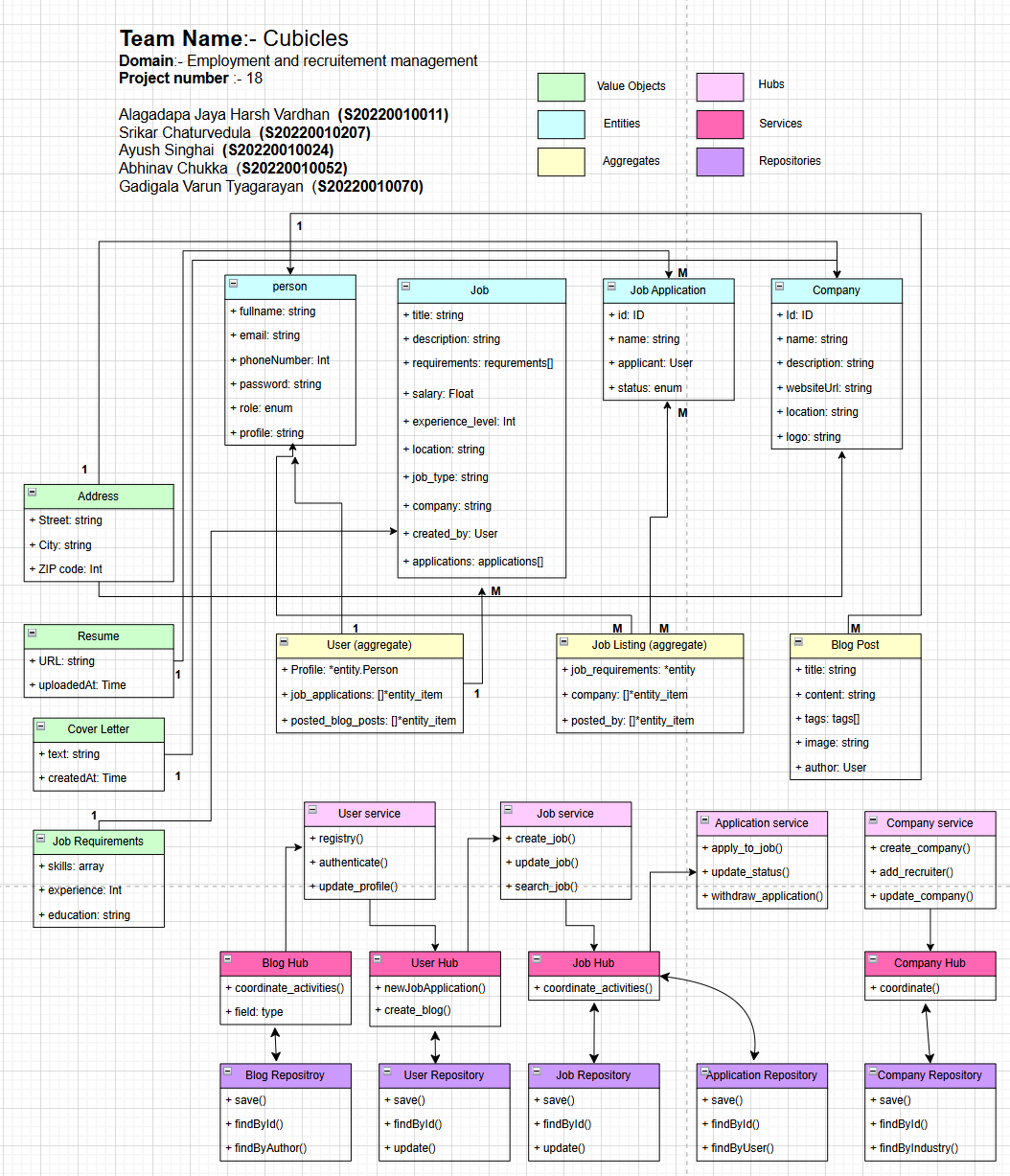
The architecture of Cubicles is designed to deliver a maintainable, and robust job portal solution. Leveraging modern technologies and Domain-Driven Design (DDD) principles, the system is structured to separate business logic from infrastructure concerns while ensuring smooth communication between components.
.png)
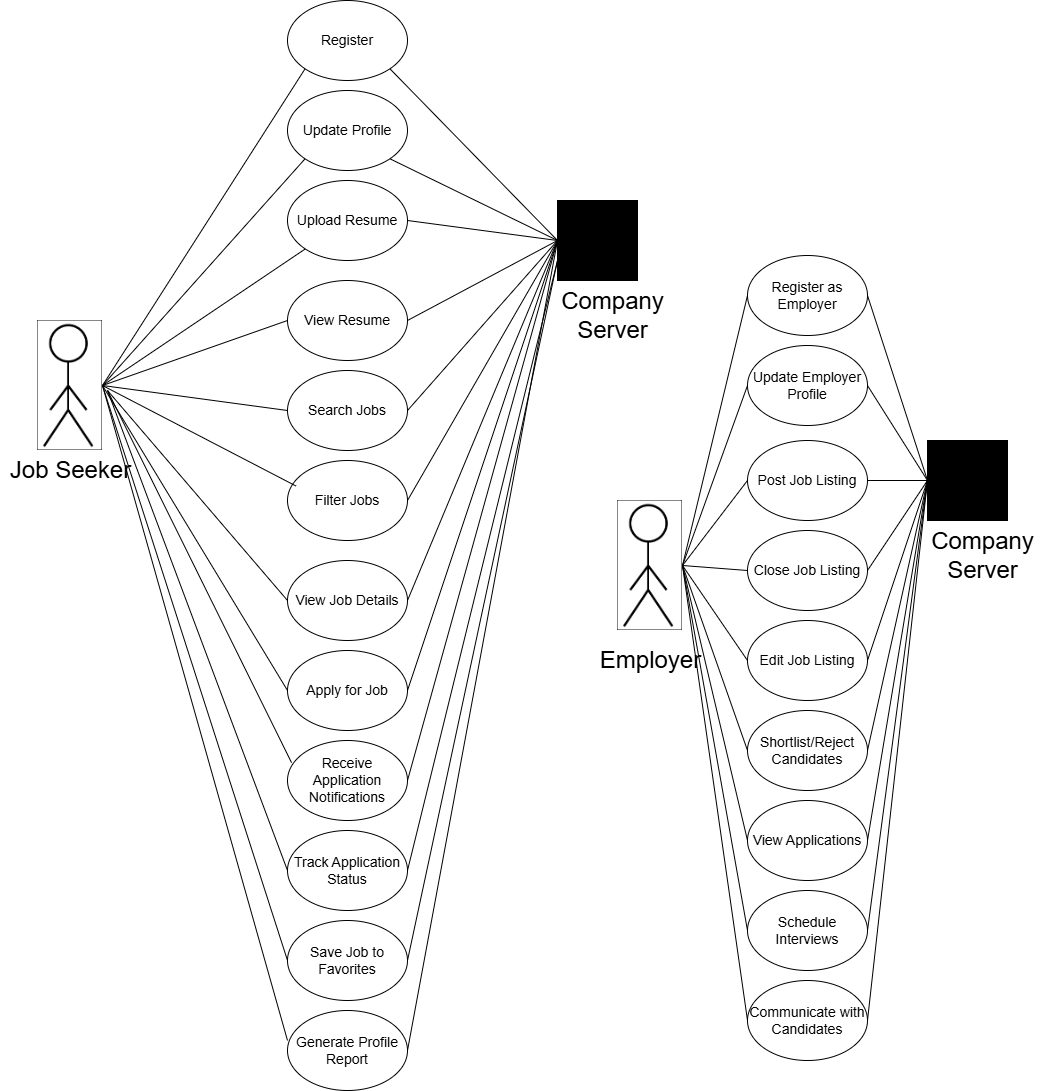
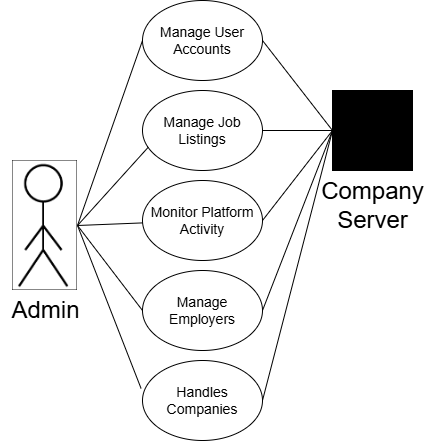
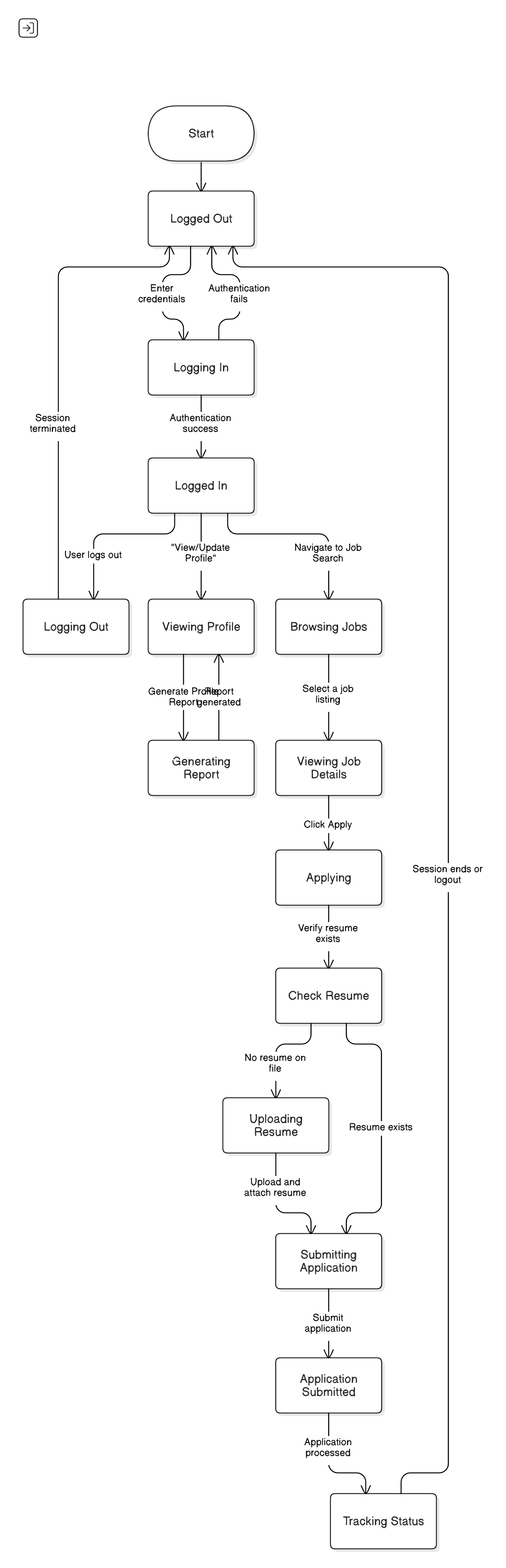
- User Management: Manages user profiles, authentication, and authorization.
- Product/Service Management: Handles data and logic for core business entities.
- Order/Transaction Processing: Manages orders, payments, and transactions.
- Reporting & Analytics: Generates reports and dashboards for actionable insights.
Below is a backend directory layout that illustrates the separation of concerns:
backend/
├── controllers/
│   ├── application.controller.js
│   ├── company.controller.js
│   ├── job.controller.js
│   └── user.controller.js
├── middleware/
│   ├── isAuthenticated.js
│   ├── errorHandler.js
│   ├── mailer.js
│   └── multer.js
├── models/
│   ├── application.model.js
│   ├── company.model.js
│   ├── job.model.js
│   └── user.model.js
├── routes/
│   ├── application.route.js
│   ├── company.route.js
│   ├── job.route.js
│   └── user.route.js
├── utils/
│   ├── cloudinary.js
│   ├── datauri.js
│   ├── rate-limiting.js
│   └── db.js
├── logs/
├── app.js
├── package.json
├── routes-data.md
├── README.md
└── .envThis document details the API endpoints available in the Cubicles job portal application. Please find the api documentation of Cubicles here:
For Swagger API documentation & visualization: Run backend server then open this in the browser:
http://localhost:3000/api-docs/
- Node.js (v14.0.0 or higher)
- npm (v6.0.0 or higher)
- Git
- MongoDB (installed and running locally or access to MongoDB Atlas)
# Clone the repository
git clone https://github.com/Cubicles2024/Cubicals-main.git

# Navigate to the project directory
cd Cubicles
If you received the project as a zip file named Cubicles-main.zip, extract it and then:
cd Cubicles-main# Navigate to the backend directory
cd backend
# Create environment file
cp .env.example .envOpen the .env file and configure your environment variables by pasting this:
MONGODB_URI=mongo_uri
SECRET_KEY==your_JWT_secret_key
CLOUD_NAME=your_cloud_name_cloudinary
API_KEY=your_cloudinary_api_key
API_SECRET=your_cloudinary_api_secret
CLOUDINARY_URL=your_cloudinary_url# Navigate to the backend directory if you're not already there
cd backend
# Install backend dependencies
npm install
# If you encounter any dependency errors, try:
npm install --legacy-peer-deps# Navigate to the frontend directory
cd frontend
# Install frontend dependencies
npm install
# If you encounter any dependency errors, try:
npm install --legacy-peer-deps# Ensure MongoDB is running locally
# If using MongoDB Atlas, make sure your connection string in .env is correct# In the backend directory
cd backend
# Start development server
npm run dev
# The server should start on port 3000 (or the port specified in your .env)
# You should see a message like: "Server running on port 3000"
# Database connection message: "Connected to MongoDB successfully"# Open a new terminal window/tab
# Navigate to the frontend directory
cd frontend
# Start the development server
npm run dev
# You should see a message with the local URL, typically:
# "Local: http://localhost:5173/"- Open your web browser and navigate to:
http://localhost:5173/ - You should see the Cubicles job portal application login page
The super user has administrative privileges across the entire application.
# Navigate to the backend directory
cd backend

# Run the super user creation script
node createSuperUser.js

# You will be prompted to enter:
# - Email
# - Password
# - Name
# Or these details might be preset in the script

# Upon success, you should see: "Super User created successfully"- Go to
http://localhost:5173/supremein your browser - Login with the super user credentials you created
- You will be redirected to the super admin dashboard
-
Backend won't start:
- Check MongoDB connection
- Verify all environment variables are set correctly
- Check for port conflicts (something else might be using port 3000)
-
Frontend won't start:
- Check for Node.js version compatibility
- Clear npm cache:
npm cache clean --force - Delete node_modules and reinstall:
rm -rf node_modules && npm install
-
API Connection Errors:
- Ensure backend is running
- Check CORS configuration in backend
- Verify API URL in frontend .env file
-
Login Issues:
- Check if JWT secret is properly set
- Verify user exists in database
- Check browser console for errors
# Backend tests
cd backend
npm test

# Frontend tests
cd frontend
npm test# Backend
cd backend
npm run build
# Frontend
cd frontend
npm run build# From project root
cd backend
npm run db:backup- Logging: Use Winston and Morgan for structured logging.
https://github.com/Cubicles2024/Cubicals-main/tree/main/frontend/reports
https://github.com/Cubicles2024/Cubicals-main/blob/main/backend/tests/Readme.md
- JWT Authentication: Secure token-based authentication.
- Helmet: Added to enhance security by setting various HTTP headers.
- HTTPS: Enforced in production with Nginx as a reverse proxy.
- Rate Limiting: Configured to mitigate brute-force attacks.
- CORS: Properly configured to allow requests from trusted origins.
Thank you for your interest in contributing to Cubicles! We welcome contributions that improve the project. Please follow these guidelines to ensure a smooth collaboration.
- Fork the Repository: Start by forking the repository to your GitHub account.
- Clone the Repository: Clone the forked repository to your local machine using:
git clone https://github.com/your-username/cubicles.git
- Install Dependencies: Run the following command to install all required dependencies:
npm install
- Create a New Branch: For new features or bug fixes, create a branch:
git checkout -b feature-name
- Write Tests: Ensure new features and bug fixes are covered with tests.
- Keep Commits Atomic: Write clear and concise commit messages following the conventional commit format:
git commit -m "feat: add new job filtering logic"
- Push Your Changes: Push the branch to your forked repository:
git push origin feature-name
- Open a Pull Request (PR):
- Go to the main repository on GitHub.
- Click "New Pull Request" and select your branch.
- Provide a clear description of your changes.
- Link any related issues (if applicable).
- Wait for Review: A maintainer will review your PR, request changes if needed, and merge it once approved.
If you encounter a bug or have a feature request, please open an issue with details.
All contributors are expected to follow our Code of Conduct to ensure a respectful and inclusive environment.
We appreciate your contributions and efforts to improve Cubicles! 🚀
- Group ID: 18
- Group Title: Cubicles
-
Name: Alagadapa Jaya Harsh Vardhan
Roll Number: S20220010011 -
Name: Srikar Chaturvedula
Roll Number: S20220010207 -
Name: Ayush Singhai
Roll Number: S20220010024 -
Name: Gadigala Varun Tyagarayan
Roll Number: S20220010070 -
Name: Abhinav Chukka
Roll Number: S20220010052
Your contributions help make Cubicles better! Whether you're fixing a bug, adding a feature, or improving documentation, we appreciate your efforts. Thank you for being a part of our community and helping us grow. 🚀